 Arcadópolis
 Checkwave
Checkwave: free to-do list, habit tracker and notes
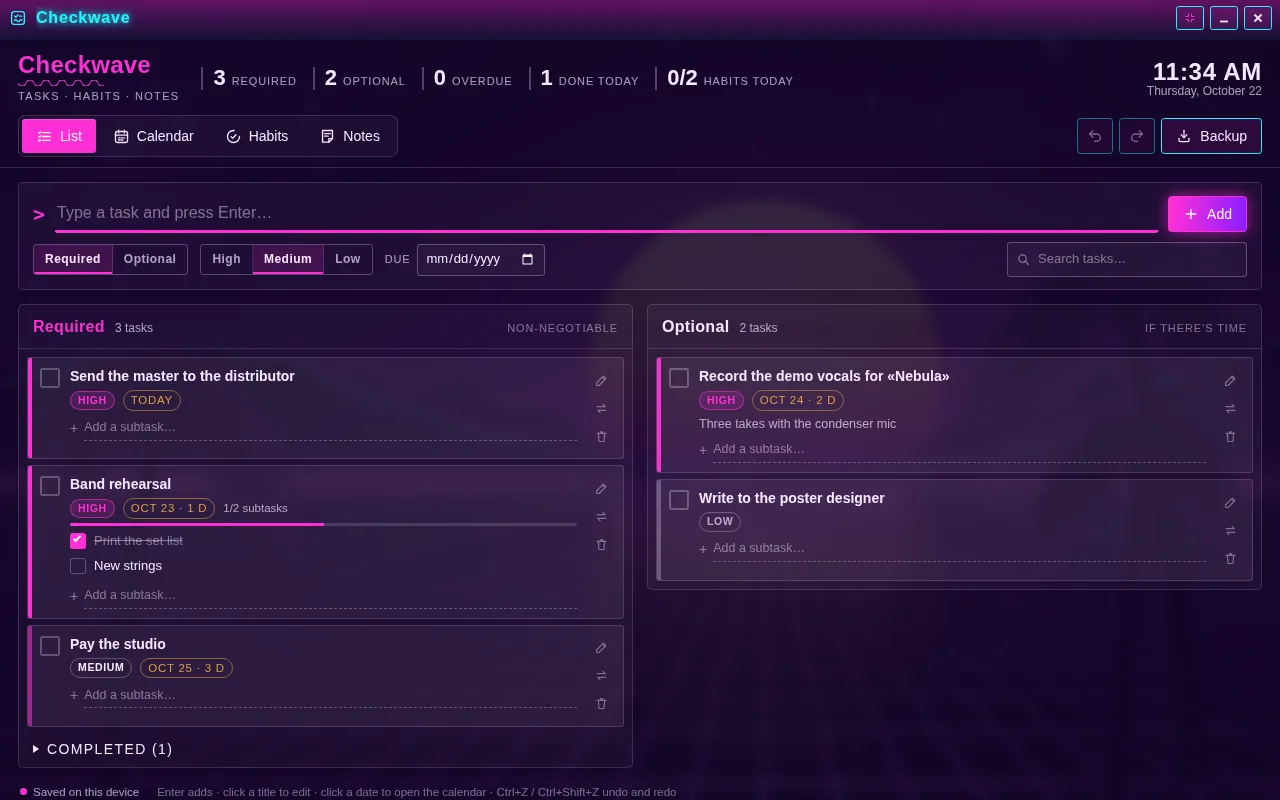
Checkwave is a free app to organize your day in the browser: a to-do list, a habit tracker, notes and a calendar in one place. Type a task and press Enter; choose whether it’s required or optional, its priority and its due date, and check it off with a box.
Everything saves itself, on your device, with no account. Undo and Redo bring back any change, and a .json backup lets you take your tasks, habits and notes to another device. Checkwave wears whichever Arcadópolis theme you choose.
Free, no ads, nothing to install.
Install Checkwave on its own on your home screen
What it has
- Required and optional tasks in two columns, with priority, due date, notes and subtasks.
- Overdue and most urgent first, and at the top how many are left, how many are overdue and how many you finished today.
- A month calendar where you drag tasks from one day to another and see your habits for each day.
- Habits to do, to avoid and timed, with streak, best streak and the last 7 days.
- Colored notes you can pin to the top or turn into tasks.
- Undo and Redo, automatic saving and a .json backup to import wherever you like.
How to use it
- Open Checkwave from its desktop icon or the start menu.
- Type a task in the top line, choose required or optional, the priority and the date, and press Enter.
- Check it off with its box when you finish; tap the title to edit it or add subtasks.
- In Calendar, Habits and Notes you plan your month, keep your streaks and jot down the rest. Backup downloads a copy.
How do habit streaks work?
Each habit counts the days in a row you kept it, only among the weekdays it applies (you can pick every day, Monday to Friday or the weekend). For habits to do you check it off each day; for habits to avoid, every day without slipping counts, and if you slip you log it and the streak resets; for timed habits, the day counts when the timer reaches your goal in minutes. Today doesn’t break the streak while you can still keep it.
What’s the difference between required and optional?
Required tasks are what can’t wait, and optional ones are what you’ll do if there’s time. They sit in separate columns, each sorted by overdue, priority and date, and a task moves from one to the other with a tap.
Common questions
Are my tasks and notes uploaded?
No. Checkwave keeps everything on this device, in your browser’s storage, along with the rest of Arcadópolis; it isn’t uploaded to our servers or synced with your account. To have it on another device, download the .json backup and import it there.
Can I bring my data from the standalone Checkwave app?
Yes. In Backup, choose the .json file you exported from the other app (or paste its contents) and press Import: you can merge it with what you have or replace everything, and Undo reverts it.
Does it work on a phone?
Yes. On a phone the columns stack, the tabs stay at the top and the calendar shows a dot for each task; tap a day to see its list and habits.
Also in Arcadópolis
 AtelierDraw, edit photos and make pixel art: real-feeling brushes, 100 filters, AI background removal and frame-by-frame animation.
 WritingFridge magnets for writing poems, Spanish décimas with a syllable meter, and the Bestiary, the encyclopedia of Arcadópolis mythology.
 Themes102 themes, 22 of them free: each one changes the desktop, the windows, the animated wallpaper and the instrument you hear.
Arcadópolis has 66 more apps on the same desktop: games, music, a 3D museum and a 3D library.