 Arcadópolis
 Atelier
Atelier: drawing, photo editing and pixel art in your browser
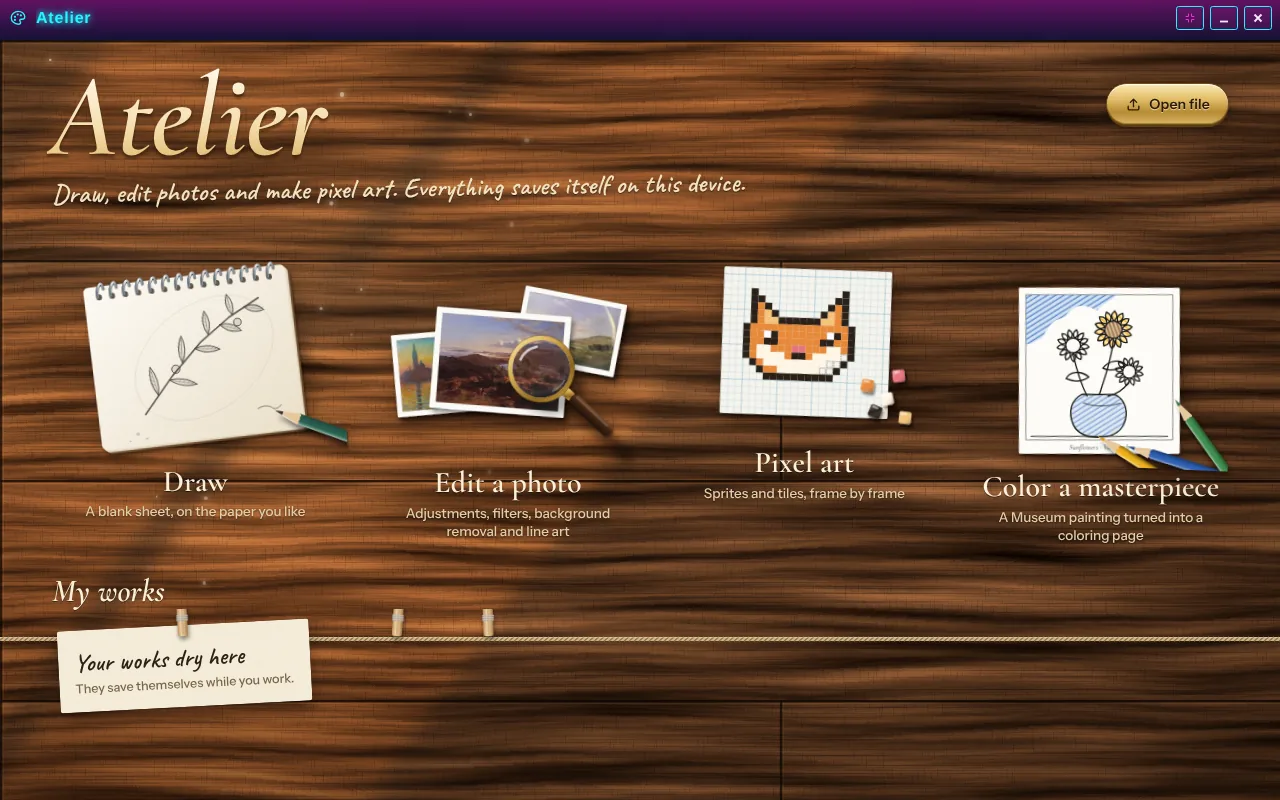
Atelier is a premium app to draw, edit photos and make pixel art in your browser, with nothing to download. When it opens you see a painter’s desk: the sketchbook for a new sheet, the photos to open an image from your device, the graph paper for pixel art and a coloring page made from a painting in the Museum.
Everything is saved on your device, while you work: your works hang on a clothesline on the welcome screen and are never uploaded to our servers; if you like, Atelier keeps a copy in your own Google Drive. Export them as PNG, JPG or WebP, as a GIF or a sprite sheet, and one of them can stay as your Arcadópolis desktop wallpaper.
Premium app: not available yet.
What it has
- A wooden palette where colors mix like real paint when you drag one onto another.
- Pencil, brush, fine pen, marker, airbrush, watercolor, chalk and calligraphy, with your stylus pressure.
- Layers with opacity, blending and lock in Advanced mode, plus selection, text, shapes and gradients.
- 100 filters you can combine, light and color adjustments, and one-tap Enhance.
- Remove backgrounds by color or with an AI that runs in your browser: your photo never leaves your device.
- Pixel art with classic palettes, symmetry, dither patterns, tile mode and frame-by-frame animation with onion skin.
How to use it
- Open Atelier from its desktop icon or the start menu.
- On the desk, tap the sketchbook to draw, the photos to edit an image, the graph paper for pixel art or the coloring page to color a painting from the Museum.
- Pick your colors on the wooden palette and your tools on the tray; Effects has the filters, the adjustments and Remove background.
- Under File, export your work or set it as the desktop wallpaper. It saves itself while you work.
How does the coloring page work?
You pick a painting from the Arcadópolis Museum, and Atelier turns it into clean lines on paper, with closed areas you fill with a tap. Less detail gives big, easy areas; more detail is a page for patient people. The palette brings the artwork’s colors, and the See the artwork button keeps the painting in view while you color.
What does Line art do?
It finds the contours and straight lines of a photo and draws them on top, in the color and thickness you like, over the photo, on black or on paper, with a neon glow if you want. With Animated blend, the lines gradually turn into the photo: download it as a GIF or a video, great for social media and presentations.
Common questions
Are my works or photos uploaded?
No. Atelier keeps your works on this device, in your browser’s storage, and does everything right there, even the AI that removes backgrounds. If you want a safe copy, connect the backup to your own Google Drive from File: works go straight from your device to your Drive, without passing through Arcadópolis, and Atelier can only see the files it creates. On another device you get them back with “Bring from Drive”, or with an .atelier project.
Do I need to download anything to remove backgrounds with AI?
Only the first time: Atelier downloads a model of about 5 MB and keeps it in your browser. After that it works instantly and offline. If the background is a single color, Automatic mode removes it without the AI.
Does it work on a phone and with a stylus?
Yes. On a phone the tool tray goes at the bottom and the palette, layers and effects slide up as sheets. If your stylus measures pressure, the stroke gets thicker or thinner depending on how hard you press.
Also in Arcadópolis
 MuseumPinacópolis, a 3D painting museum: three wings, 40 rooms and more than 440 public-domain works, with notes, routes and a guided tour.
 Sticker albumsNine sticker albums and 507 stickers, with paintings, books, places from the 3D worlds, games and themes; new stickers hide every day at noon.
 RecorderRecord what happens in Arcadópolis as video or audio only.
Arcadópolis has 66 more apps on the same desktop: games, music, a 3D museum and a 3D library.