 Arcadópolis
 Sound Stamps
Sound Stamps: an easy, free way to compose music
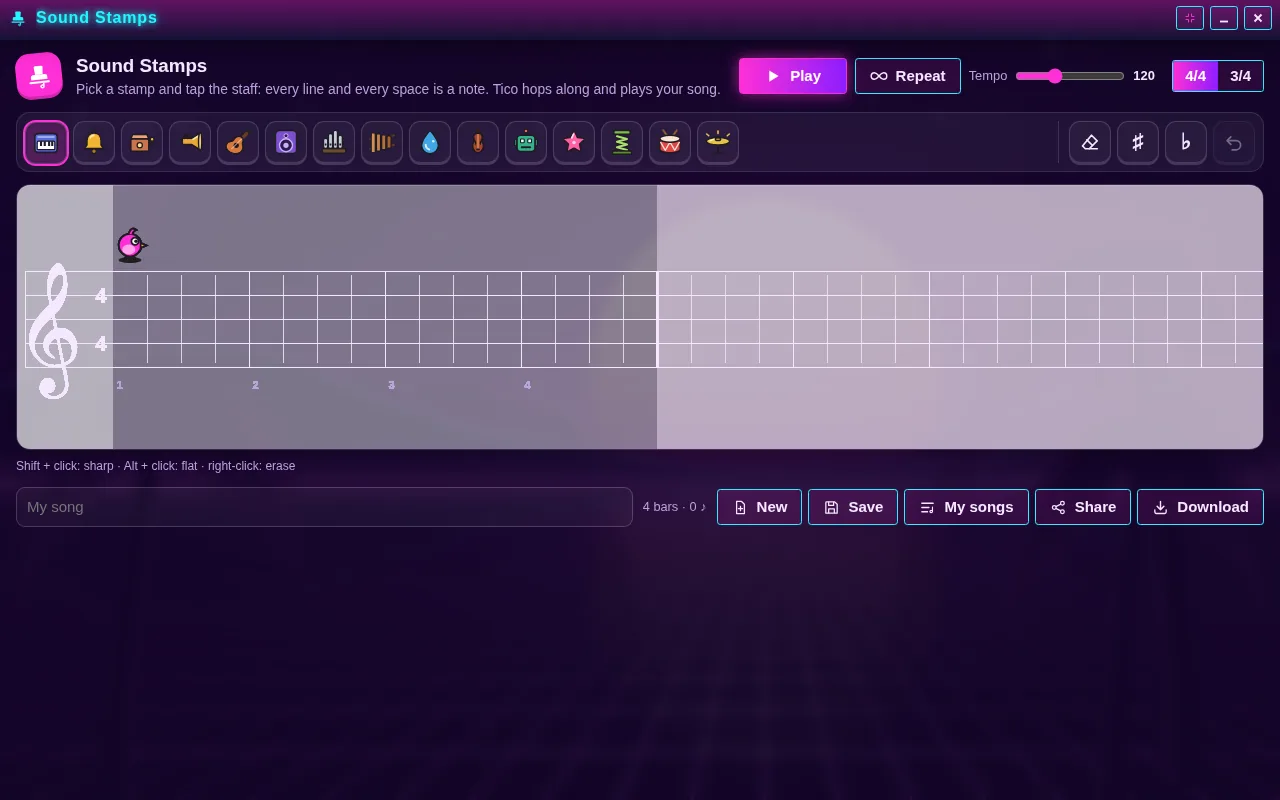
Sound Stamps is a free app for composing music by stamping instruments on a staff, right in your browser with nothing to download. Pick a stamp (a piano, a trumpet, a drop, a robot…) and put it on a line or a space: the higher it goes, the higher it sounds.
When you press “Play”, Tico, a little bird, hops from beat to beat and each stamp bounces as it plays. It’s an easy way to compose without reading music, and it works with the mouse, the keyboard or your finger.
Its icon is on the Arcadópolis desktop.
Free, no ads, nothing to install.
Install Sound Stamps on its own on your home screen
What it has
- 15 stamps: piano, bell, music box, trumpet, guitar, bass, organ, marimba, drop, violin, robot, star, spring, drum and cymbal.
- Up to 4 stamps on the same beat, so you can build chords.
- Sharps and flats, an eraser and undo.
- Tempo from 60 to 240 per minute, 4/4 or 3/4 time and repeat.
- Three examples: Ode to Joy, Frère Jacques as a round and Twinkle, Twinkle.
- Up to 30 saved songs, a link to share and MIDI or audio downloads.
How to use it
- Open Sound Stamps from the Arcadópolis desktop.
- Pick a stamp from the palette: you hear how it sounds as you choose it.
- Tap the staff where you want the note. Shift + click makes it sharp, Alt + click makes it flat and right-click erases it; on a phone, use the eraser.
- Press “Play” and listen to Tico go through your song; then save it or share it with a link.
How to read notes on the staff
Every line and every space on the staff is a different note, and moving up one place moves you one step up the scale: C, D, E, F, G, A, B. Sound Stamps has 16 places, a little over two octaves, so you see the notes climb and fall like a staircase. A sharp raises a note by a half step and a flat lowers it by a half step. Each stamp also plays in its own octave: the bass and the drum sound lower; the bell, the drop and the star, higher.
Ideas for your first song
Open an example and see how it’s made. Twinkle, Twinkle carries the melody with stars and an accompaniment of drops; Ode to Joy brings together piano, bass and cymbal; and Frère Jacques is a three-voice round: the same melody comes in three times, on piano, bell and trumpet. Then make your own: start with four bars, repeat the idea with another instrument and let Tico play it on a loop while you change it.
Common questions
Do I need to read music?
No. You hear each stamp as you place it and change anything you don’t like; watching the stamps climb and fall also helps you understand the staff little by little.
Does it work on a phone or tablet?
Yes. With your finger, the lines and spaces spread out so it’s easier to hit the right note, and you remove a stamp with the eraser.
Can I share or download my song?
Yes. “Share” makes a link to your song, and “Download” gives it to you as MIDI or audio (WAV, FLAC, MP3, OGG or AAC), played with your stamps’ sounds.
Also in Arcadópolis
 Eight Notes
 Musical Trains
 Studio
Arcadópolis has 66 more apps on the same desktop: games, music, a 3D museum and a 3D library.