 Arcadópolis
 Recorder
Free screen and audio recorder in your browser
The Recorder is a free app to record video and audio in your browser, with nothing to download: it records what happens in Arcadópolis, your camera or your screen, with the games’ sound and your voice. Choose what to record, press Record and, after a 3-second countdown, you can minimize it and go play.
Your recordings are saved only on your device and are never uploaded. In My recordings you can play, rename, delete or download them: the video as .mp4 or .webm, depending on your browser, and the sound also as MP3 or WAV.
Free, no ads, nothing to install.
Install Recorder on its own on your home screen
What it has
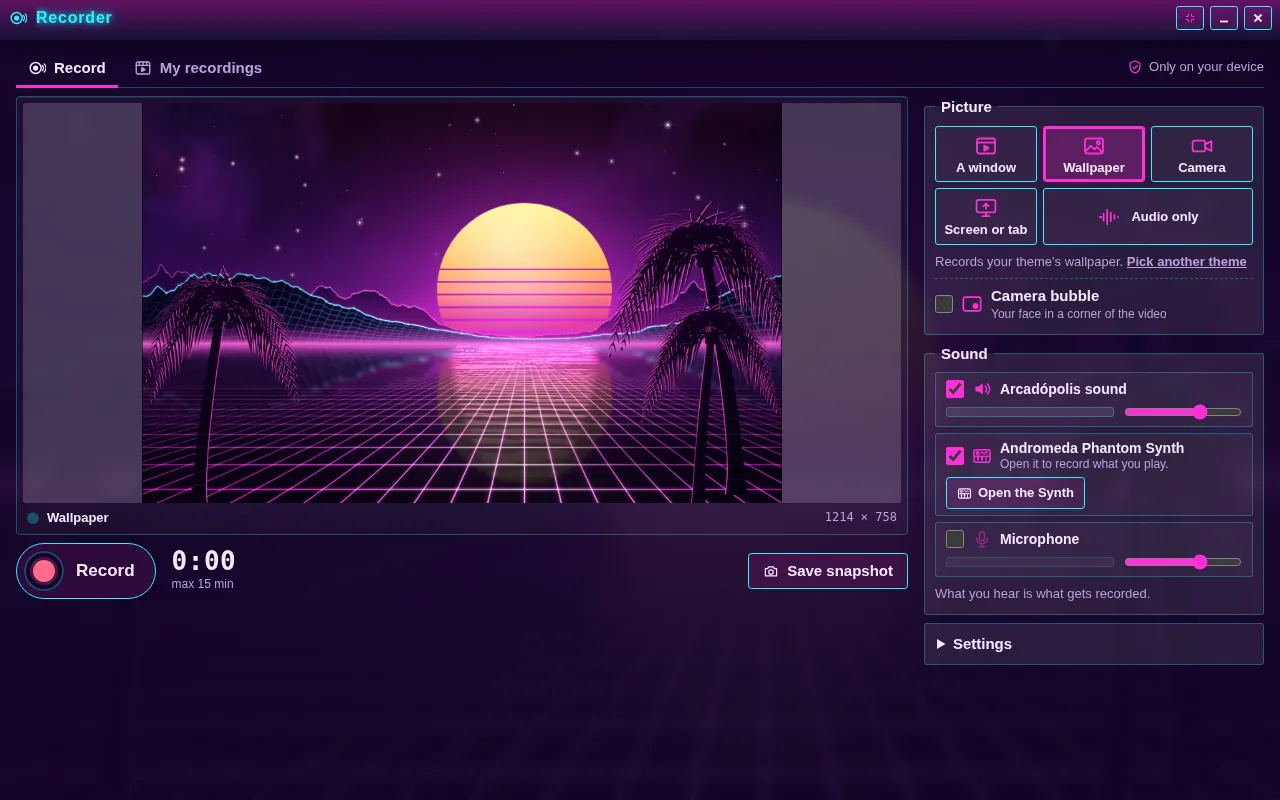
- Five picture options: a window, the wallpaper, the camera, the screen or a tab, or audio only.
- A camera bubble in any of the 4 corners, with mirror mode.
- A 3-channel mix with volume and meters: Arcadópolis, Andromeda Phantom DAW and the microphone.
- Light (480p), Normal (720p) or High (1080p) quality, at 30 frames per second.
- Up to 15 minutes per recording, with pause and shortcuts: R records or stops, P pauses.
- PNG snapshots, live or from a recording.
How to use it
- Open the Recorder from its desktop icon or the start menu. Under Picture, choose what to record; for a window, open the game or world first.
- Under Sound, turn on the channels you want and set their volume.
- Press Record (or R). After the 3-second countdown, minimize the Recorder and go play.
- Tap the red dot on the taskbar to stop: your video will be waiting in My recordings.
What can I record?
A window that draws on screen, like the Museum, Snake, Musical Trains or Arcade 3D; your theme’s animated wallpaper; your camera; your screen or a whole tab; or just the sound. If you share the Arcadópolis tab, its menus and every open window are recorded too. The camera bubble puts your face in a corner over the window, the wallpaper or the screen, and you can turn off mirror mode when you show text to the camera, so it reads the right way.
How is sound recorded?
What you hear is what gets recorded: if you turn off the taskbar speaker, the recording is silent, and the Recorder warns you and offers to turn the sound on. The microphone never plays through your speakers, and whatever you play in Andromeda Phantom DAW comes in on its own channel without sounding twice. To download just the sound as MP3 or WAV, the recording must be 5 minutes or shorter; longer ones download as the original file.
Common questions
Are my recordings uploaded?
No. They’re saved only on this device, in your browser’s storage, and nobody else sees them. The Recorder shows how much space they take; download them if you want to keep them somewhere else.
Why does it ask for permissions?
Your browser asks the first time you use the camera or the microphone or share your screen, and only after you tap the button. If you said no by mistake, change it from the lock next to the page address.
Does it work on a phone?
Yes, if your browser can record video; if it can’t, the Recorder tells you when you open it. If your device can’t share the screen, that option shows as unavailable and explains why, and you can still record a window, the wallpaper, the camera or audio only.
Also in Arcadópolis
 Andromeda Phantom DAWA complete music studio: multitrack DAW, a synthesizer with over a thousand sounds, drums, theory, a sampler, voice effects and a visualizer.
 Chiptunia TrackerCompose 8-bit songs on four channels, like on classic consoles.
 Arcade 3DA 3D arcade hall: walk among the cabinets and open each game.
Arcadópolis has 66 more apps on the same desktop: games, music, a 3D museum and a 3D library.